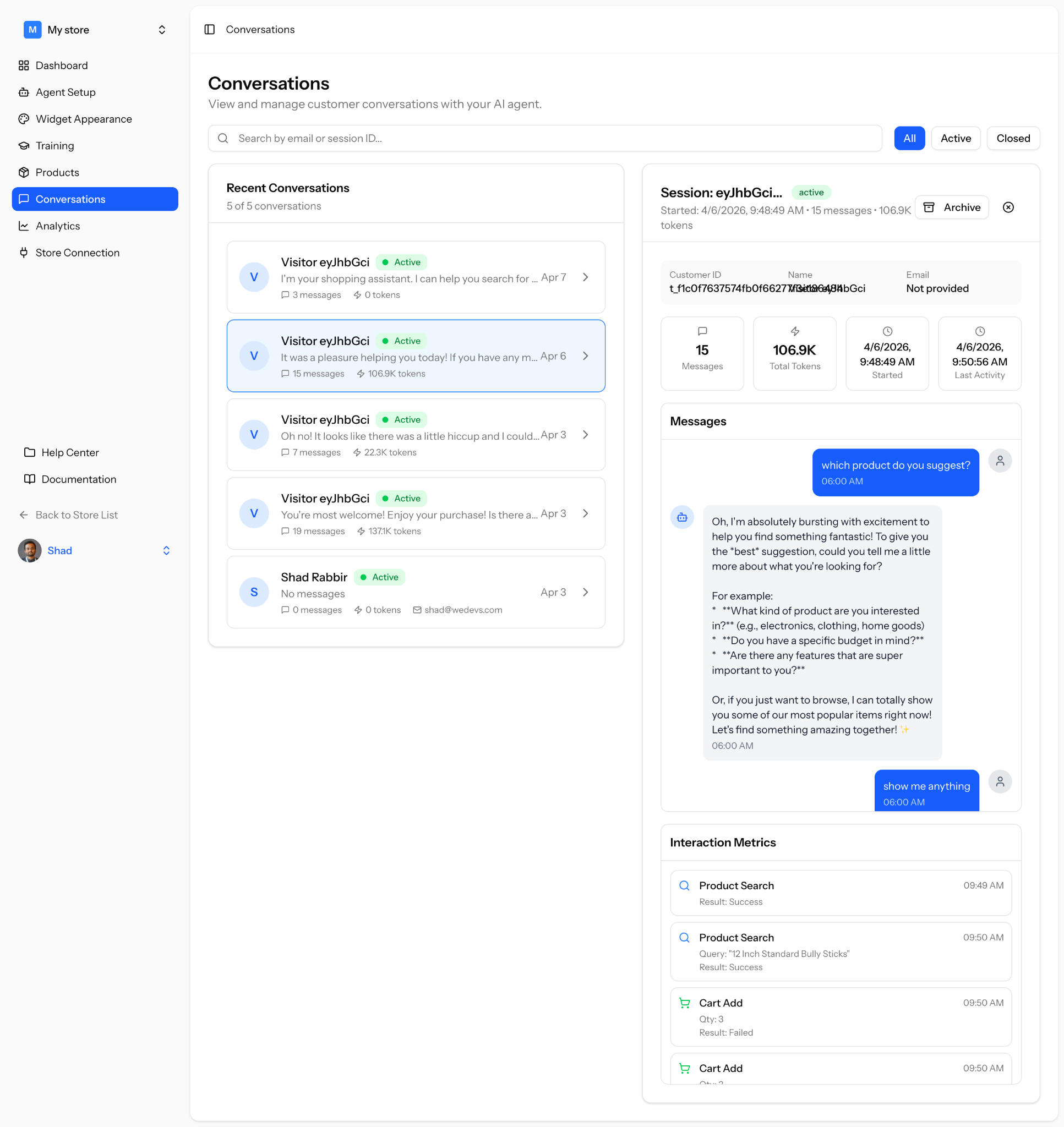

You can View and manage all customer conversations from this section.
You can find specific conversations using email or session ID. See all recent conversations in one place.
Each conversation shows:
- Customer name or visitor ID
- Status (Active or Closed)
- Number of messages
- Token usage
- Last activity time
Click a conversation to view full details.
Filters
Switch between different conversation views.
All
See every conversation.
Active
View ongoing conversations.
Closed
View completed conversations.
You can view full details of a selected conversation.
Session Info
Get an overview of the conversation.
- Session ID
- Status
- Start time
- Total messages
- Token usage
Customer Details
Basic information about the customer.
- Customer ID
- Name
- Email (if available)
Messages
See the full chat between the customer and your AI agent.
Track how your agent responds and how customers interact.
Interaction Metrics
Understand what happened during the conversation.
Includes:
- Product searches
- Cart actions
- Query results (success or failure)
- Timestamps for each action
Archive Conversation
Move the conversation out of active view for better organization.